
3D Graphics
Don’t Think of Autodesk Flow Studio as Just Another AI Tool
When many CG creators first saw news about Autodesk Flow Studio, they likely thought “another AI feature added to Maya.” But as you read through the feature list carefully, the story changes. You begin to see a flow where existing VFX preparation stages—video analysis, motion extraction, camera tracking, character compositing, and 3D asset generation—are moving into the Autodesk ecosystem.
This article is not meant to introduce Flow Studio. It analyzes which stage of the CG production pipeline is changing, and why creators should pay careful attention to this transformation right now.
Don’t Think of Autodesk Flow Studio as Just Another AI Tool
Flow Studio is a cloud-based AI VFX/3D production platform that continues from the earlier Wonder Studio. After Autodesk acquired Wonder Dynamics, the Wonder Studio family of features was consolidated under the name Autodesk Flow Studio. In August 2025, Autodesk announced Flow Studio’s free tier and new pricing structure, officially establishing this tool within the Autodesk ecosystem.
The important point here is that Flow Studio is not a new feature of Maya. It is more accurate to see Flow Studio as a cloud platform that reduces the preparation stage between shot footage and 3D production tools—between planning and main production. The correct perspective is that it is an AI production assistant tool that comes before Maya.
The first reaction readers will have is predictable: “Is this another story about AI killing Maya?” This article’s conclusion is the opposite. Rather than reducing the role of post-production tools like Maya, Blender, and Unreal, Flow Studio may actually reduce the earlier stages while making the judgment and quality control roles of post-production tools more important.
The change CG creators should watch first is pipeline compression
The core change Flow Studio brings is not a single feature but the pipeline structure. In traditional CG production, stages like Concept → Modeling → Rigging → Motion Capture → Camera Tracking → Compositing → Post-production DCC finishing each required separate preparation and personnel.
The direction Flow Studio officially presents is to reduce the early and middle stages of this flow with AI. 3D asset generation, AI motion capture, Camera tracking, Editable exports, and Maya/Blender/Unreal integration are the features emphasized on Flow Studio’s official page. The individual features are not remarkable in themselves; what stands out from a pipeline perspective is how these features are connected within a single platform.
| Stage | Traditional Method | Changes After Flow Studio |
|---|---|---|
| Concept | 2D sketches, reference collection | Rapid visualization with Text to Image |
| Model Draft | Modelers create directly | Asset generation with Wonder 3D |
| Rigging | Professional rigger sets up skeleton and controllers | Basic preparation with AI Rigging |
| Motion | Motion capture equipment or keyframing | Video-based AI Mocap |
| Compositing Prep | Tracking, masks, clean plates | Shortened with editable outputs |
| Finishing | Complete final work in DCC tools | Revise and finish in DCC after export |
Just a few years ago, each stage required specialists
In the traditional CG production structure, the roles of modeler, rigger, animator, motion capture coordinator, and tracking/compositing specialist were clearly divided. Large studios managed quality through this division-of-labor structure, and the expertise at each stage determined the quality of the final result.
For individual creators and small teams, this structure was a barrier to entry itself. Without motion capture equipment, it was difficult to move characters realistically. Camera tracking and alpha masking required both specialized software and experience. Rigging alone could take days depending on character structure.
Now the shift is toward AI making drafts and artists refining them
Looking at Flow Studio’s feature direction, you can see a shift in the center of gravity from “directly creating work” to “evaluating and refining AI drafts.” This does not mean AI guarantees final quality. It means a reduction in the cost of initial drafts and iteration, with humans shifting to a structure where they judge direction and quality.
Whether the topology of an AI-generated model draft suits DCC work, whether the deformation quality of AI Rigging results is sufficient for shot requirements, and whether the lighting and compositing of outputs with Neural Layer applied match the actual scene—these still require human judgment. AI pulls forward the starting point; it does not replace the end point.
Wonder 3D is the entry point for turning ideas into 3D assets
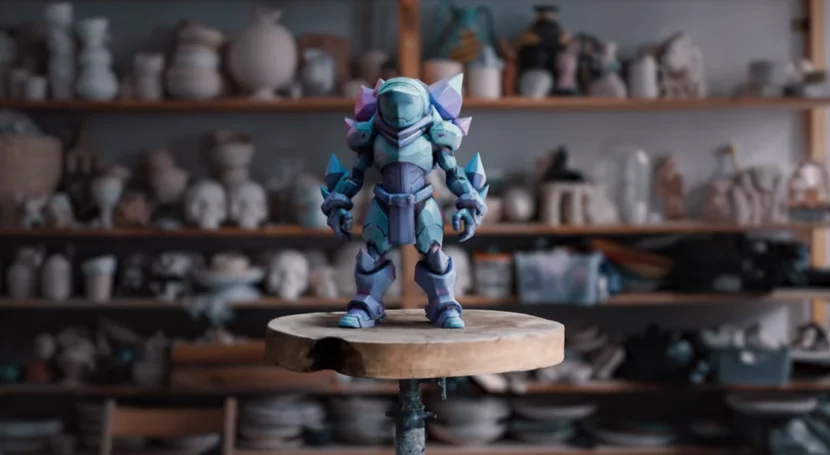
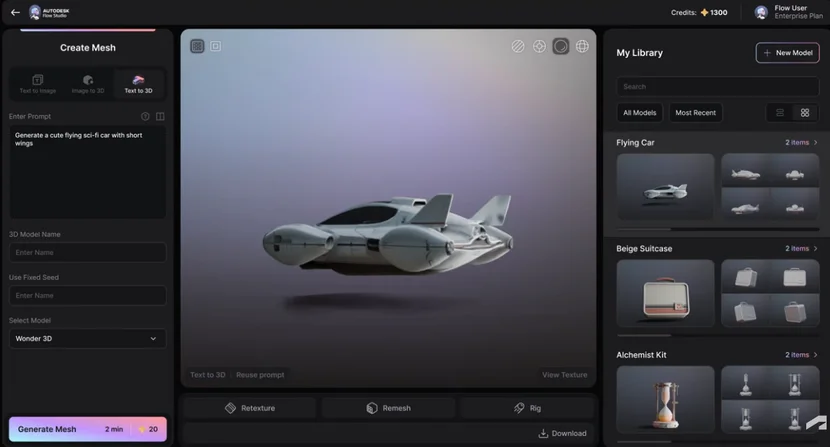
Wonder 3D is a generative AI model within Autodesk Flow Studio. According to Autodesk’s official news, it was announced on April 2, 2026, and Autodesk explains that it adopted Wonder 3D on March 4, 2026. This tool offers three functions that create editable 3D assets from text prompts or images.
| Feature | Input | Output |
|---|---|---|
| Text to 3D | Text prompt | Character, creature, and prop 3D assets |
| Image to 3D | Sketch, reference, and concept art | Editable 3D models with textures |
| Text to Image | Text prompt | Concept visualization before 3D production |
Generated assets can be exported as USD, STL, or OBJ. USD is an important format for linking with Maya, Blender, Unreal, and 3ds Max, while OBJ has high universal DCC compatibility. STL can lead to 3D printing or physical prototyping. Autodesk describes this flow as “rapidly connecting workflow from concept to downstream production.”
AI Rigging and Neural Layer are the later stages that bring characters to life
If Wonder 3D is the entry point for asset generation, then AI Rigging and Neural Layer, which Autodesk announced on April 28, 2026, are the later stages that actually bring characters to life and integrate them into footage. With the addition of these two features, Flow Studio shows a flow toward expanding from a simple 3D model generator into a character performance platform direction.
According to Autodesk, AI Rigging prepares 3D models as animation-ready characters in minutes, drives animation from video input, and exports to Maya, Blender, and Unreal. Neural Layer is described as a feature direction that handles skin, hair, fur, materials, lighting, subtle expressions, physics/cloth simulation, and compositing in faster ways without the burden of traditional rendering pipelines.
| Feature | Work reduced | Parts humans must verify |
|---|---|---|
| Wonder 3D | 3D asset draft from text/image | Topology, detail, style consistency |
| AI Mocap | Video-based motion extraction | Finger, facial, and complex action correction |
| Camera Tracking | Alignment of shot footage and CG scene | Tracking correction for challenging shots |
| AI Rigging | Character animation preparation | Detailed rig controls, deformation quality |
| Neural Layer | Rendering expression quality accessibility | Final lighting, compositing, shot direction |
| Editable Export | DCC post-work connection prep | Cleanup and finishing within DCC |
Since Neural Layer is still in the official announcement stage, actual quality and stability in production environments cannot be determined before use. Particularly in areas like cloth simulation or subtle expressions, post-work by shot is likely necessary.
Flow Studio does not replace Maya
This is the part that needs to be stated most clearly in this article. The official Flow Studio page also explains that USD-based integration is possible with Maya, Blender, Unreal, and 3ds Max, emphasizing the interoperability that allows users to bring their work to their preferred 3D tools and game engines. This is Autodesk itself clarifying that Flow Studio is not replacing DCC tools, but rather a platform that reduces the preparatory work at the front end.
For Maya users, Flow Studio is a front-end tool that reduces preparation steps for modeling, rigging, motion capture, and some camera tracking. Blender users can leverage it as a connection point to import generated assets and scene data, then continue with modifications, rendering, and compositing. Unreal users can connect it to XR, game, and virtual production scene composition and testing.
| DCC Tool | Role After Flow Studio | Caution |
|---|---|---|
| Maya | Rig adjustment, animation detail, rendering, final finishing | Quality review of AI rig transformation results needed |
| Blender | Model modification, texture rework, compositing, rendering | USD import settings verification required |
| Unreal Engine | Scene composition, virtual production, real-time rendering | Asset optimization and topology cleanup needed |
| 3ds Max | Scene reconstruction, post-production rendering, architectural/visualization | Format compatibility pre-check required |
Where Will CG Artists’ Roles Shift?
If Flow Studio’s functional direction continues, the center of gravity for CG artists’ roles can shift from “people who make everything by hand” to “people who evaluate and revise AI drafts and organize them to fit the pipeline.” This does not mean fewer artists are needed. It means the kinds of judgments required are changing.
Whether topology matches DCC work and subsequent rendering, whether rigging meets shot requirements, whether animation detail reflects directorial intent, whether lighting and compositing match the scene’s atmosphere—these still need to be determined by people. Shot direction and final quality judgment are areas AI cannot replace.
| Previous Role | Role Becoming Important Going Forward | Judgment Required |
|---|---|---|
| Direct model creation | AI draft review and revision | Topology quality, DCC compatibility |
| Rigging setup | AI rig result evaluation and adjustment | Deformation quality, controller structure |
| Motion keyframing | AI motion refinement and directorial adjustment | Movement intent, timing, detail |
| Compositing/Tracking | Output review and per-shot correction | Scene consistency, lighting compositing |
| Rendering setup | Connecting AI output with final rendering | Quality standards, pipeline conformance |
Greater Significance for Small Teams and Individual Creators
Large studios already have motion capture equipment, specialist riggers, and compositing pipelines in place. Therefore, Flow Studio’s functionality is most strongly felt among individual creators, indie developers, YouTube/short film producers, and advertising concept artists—environments where a single person or small team had to handle this entire preparatory phase alone.
Autodesk’s official announcement also includes indie developers, hobbyists, content creators, and marketing/creative teams beyond professional studios. The core of this change is not “better results” but rather “reduced entry barriers—enabling work that couldn’t be done before to be attempted.”
Still, Don’t View Flow Studio as a Magic Button
Flow Studio is a cloud-based platform. You must upload data, there is a cost structure, and generation quality varies depending on purpose and shot conditions. The topology of models created by Wonder 3D cannot always be assumed to be optimized for DCC work, and AI Rigging results do not guarantee uniform quality across all character types.
Subtle facial expression control, finger movements, complex cloth simulation, and per-shot compositing quality are currently difficult areas for AI to complete automatically. Neural Layer is still in official announcement stage, so its stability in actual production environments requires verification. Pricing, processing speed, commercial use terms, and detailed format limitations should be confirmed directly on the Flow Studio official page.
Reading Autodesk’s Signal
Autodesk has not officially declared it will “transform the entire CG pipeline.” Determining Autodesk’s ultimate goal is beyond the scope of this article. However, looking at the flow from the 2025 Flow Studio free tier introduction, March 2026 Wonder 3D announcement, and April AI Rigging and Neural Layer additions, it can be read as a move to draw the preparation phase between video and 3D scenes into the Autodesk ecosystem.
Whether this leads to overall changes in the CG production pipeline cannot yet be determined. However, from a creator’s perspective, this directional signal itself is why you should pay attention now.
| Name | Identity | Easily Confused Part |
|---|---|---|
| Wonder Studio | Wonder Dynamics’ existing AI VFX platform | Integrated into Flow Studio after Autodesk acquisition |
| Autodesk Flow Studio | Autodesk’s current cloud-based AI 3D/VFX platform | Not a Maya feature; separate platform |
| Autodesk Wonder 3D | Generative AI model within Flow Studio | Different from open-source Wonder3D |
| Open-source Wonder3D | 3D generation model released by researchers | Unrelated to Autodesk; used in ComfyUI and others |
Frequently Asked Questions
What’s the difference between Flow Studio and Maya?
Does Flow Studio replace Maya?
Are Wonder 3D and open-source Wonder3D the same?
Can I import Flow Studio results into Maya or Blender?
Is it a threat or opportunity for CG artists?
※ This article is written based on publicly available resources and actual production environments.