
3D Graphics
Free vs Paid 3D Models: The Real Difference, Hidden Costs, and When to Use Each
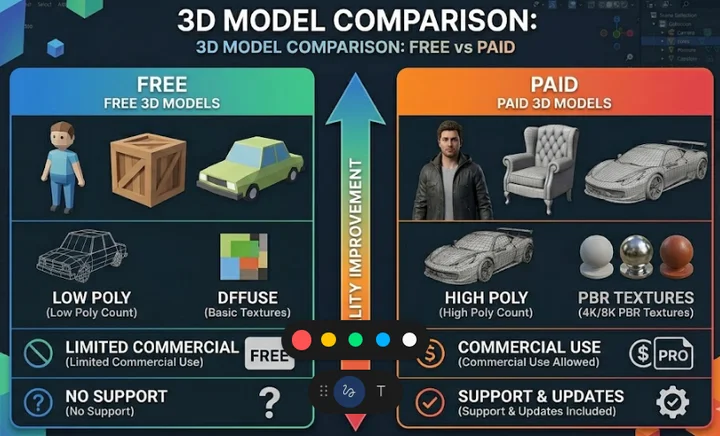
Free vs Paid 3D Models: The Real Difference, Hidden Costs, and When to Use Each
Free vs paid 3D models explained. Learn the real differences, hidden costs, licensing risks, and when to use free or premium 3D assets in production workflows.
Introduction
Free 3D models are everywhere. At first glance, they seem like the perfect solution—no cost, instant download, and quick integration.
But in real production workflows, free assets often introduce more problems than they solve. From broken topology to unclear licensing, the hidden costs quickly add up.
This article breaks down the real difference between free and paid 3D models, based on actual production use—not theory.
The Reality of Modern 3D Workflows
A typical 3D pipeline includes:
- Modeling
- Retopology
- UV Mapping
- Texturing (PBR)
- Lighting
- Rendering or Engine Integration
Tools like Blender, Unreal Engine, and Unity are widely used, but the real issue is asset consistency.
Free models often break this pipeline due to inconsistent scale, poor topology, missing textures, and lack of optimization.
The Hidden Cost of Free 3D Models
Common Issues
- Bad topology (not animation-ready)
- Broken or stretched UVs
- Missing PBR maps
- No LOD optimization
- Unclear or restrictive licenses
In many cases, fixing these issues takes more time than creating a model from scratch.
When Free 3D Models Actually Make Sense
Best Use Cases
- Rapid prototyping
- Scene blocking
- Learning and practice
- Temporary placeholders
Free assets are useful in early stages, but not suitable for final production.
Why Paid 3D Assets Are Worth It
What You Get
- Clean topology
- Proper UV layout
- Full PBR texture sets
- Optimized geometry
- Engine-ready formats (FBX, GLB)
- Commercial-safe licensing
In production, saving time is more valuable than saving money.
What Actually Sells in the 3D Market
Low Demand
- Single objects (one chair, one car)
- Generic standalone models
High Demand
- Asset packs (kitbash sets)
- Game-ready low poly assets
- Complete environments
- Use-case specific assets (game, archviz, product rendering)
Buyers are not buying models. They are buying ready-to-use solutions.
AI 3D Tools – Fast but Not Production Ready
AI tools like TRELLIS.2 allow fast image-to-3D generation, useful for prototyping and concept work.
- Mesh artifacts
- Poor topology
- Inconsistent geometry
These models still require cleanup in professional tools before use.
A Practical Workflow Strategy
Step 1: Blockout
Use free assets for layout and scale testing.
Step 2: Replace Key Assets
Replace important elements with high-quality or paid assets.
Step 3: Optimize
Ensure consistent scale, topology, and materials.
Step 4: Final Polish
Apply lighting, rendering, and presentation improvements.
How to Decide: Free or Paid?
- Will this asset be visible in the final result?
- Does it affect quality perception?
- Is fixing it slower than replacing it?
- Is the license safe for commercial use?
If the answer is unclear, paid assets are usually the safer choice.
Conclusion
Free 3D models are useful—but limited. They work well for learning and early-stage development.
Paid assets dominate real production because they save time, ensure consistency, and reduce risk.
The real cost is not the price of the asset—it is the time you spend fixing it.
Tags: 3D models, free 3d assets, premium 3d assets, blender workflow, unreal engine assets, unity assets, pbr textures, game development assets